
For who?⚓
SCENARIchain-server is intended for organizations (school, administration, company) willing for a centralized system for document production and publication. Its installation must be assumed by a system administrator of the Information System Department. |  |
For what?⚓
Assist the authors in the writing of textual, interactive and multimedia contents
Make the structuration of the content in recombinable fragments easier
Provide the various actors of the document production workflow with standard Scenari publishing chains or adapted ones to the needs of the organization
Master the implementation of the Scenari publishing chains
Centralize, share and manage the produced contents
Offer advanced document features: history, trash, derivation of contents...
Enable the collaboration between the writers, experts, proofreaders: writing, proofreading and validation cycles
Define access rights for each type of profile
Organize the teamwork
Manage the localization of the productions (translation, regional specificities,...)
Automate the publication of documents in various formats for different channels (online, mobile, print...).
How does it work?⚓
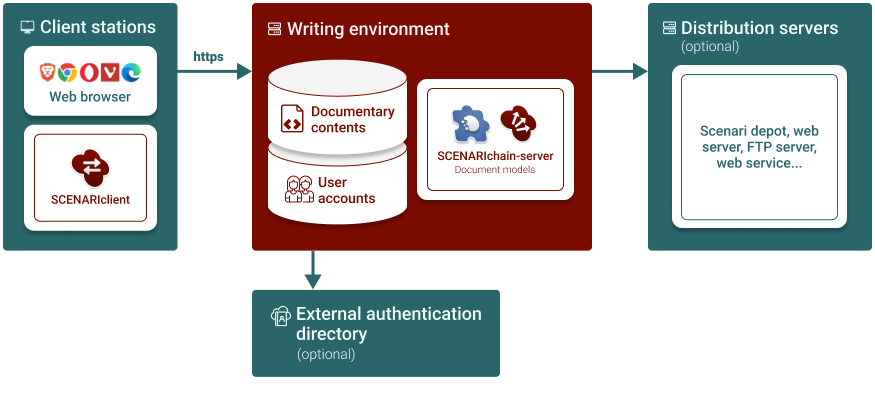
SCENARIchain-server is a java web application (webapp). XML contents are stored in its own document graph oriented databases system. Documents are generated on the server.
Scenari editor is accessible through from a simple up-to-date web Browser (Brave, Chrome, Chromium (for Linux distributions), Edge, Opera, Vivaldi).
Installing SCENARIclient, built with Electron's engine and offering the same web editor, is an alternative to using a web browser.
Communication between the client layer and the server uses https protocole.
Which software to choose?⚓
Scenari offers various types of servers.